빠른요약

// store/index.ts

import { useSelector } from "react-redux";
import { configureStore } from "@reduxjs/toolkit";

const store = configureStore({
  reducer: { books: booksSliceReducer, searchResult: searchResultReducer },
});

type RootState = ReturnType<typeof store.getState>;
type SelectFn = (state: RootState) => typeof state[keyof typeof state];

export const useMySelector = (selectFn: SelectFn) => useSelector(selectFn);


기존에 사용하던 불편한 방식

// store/index.ts

import { configureStore } from "@reduxjs/toolkit";

const store = configureStore({
  reducer: { books: booksSliceReducer, searchResult: searchResultReducer },
});

export type RootState = ReturnType<typeof store.getState>;
// component/MyComp.tsx

import { type RootState } from "@/store";

const { booksData } = useSelector((state: RootState) => state.books);

useSelector 훅을 사용할 때마다  RootState 타입을 import 해와야해서 불편하다.


개선된 방식

// store/index.ts

import { useSelector } from "react-redux";
import { configureStore } from "@reduxjs/toolkit";

const store = configureStore({
  reducer: { books: booksSliceReducer, searchResult: searchResultReducer },
});

type RootState = ReturnType<typeof store.getState>;
type SelectFn = (state: RootState) => typeof state[keyof typeof state];

export const useMySelector = (selectFn: SelectFn) => useSelector(selectFn);

store의 타입을 지정한 custom useSelector 훅을 만들어 두면  더이상 RootState 타입을 임포트 하지 않고 타입스크립트의 이점을 누릴 수 있다.


- flex 아이템의 default flex-shrink는 1임 => 부모요소크기가 모자르다면 자식이 줄어든다.

- 줄어들지 않게끔 flex아이템의 flex-shrink 값을 0으로 두면 스크롤이 생성된다.


그래프 개념

DFS 그래프순회

좌) A 를 시작점으로, 우) C를 시작점으로

  • 선택한 정점(A)의 인접점(B,C,D) 중 하나를 선택(B)하고 방문한다. 방문한 정점의 인접점이 없을 경우(이전 정점제외) 이전 정점의 다른 인접점을 탐색한다.
  • 방문한 정점(B)이 인접점이 있을 경우 인접점(E)을 방문하고 위의 논리를 반복한다.
  • 이때 인접점이 여러 개일 경우 어떤 것을 우선으로 방문할 지 정할 수 있다. 그림 예시에서는 abc순으로 정했다.


DFS 그래프순회 구현하기

  • 참고) 여러 인접점에 대한 우선순위를는 고려하지 않았다.
class Graph {
    // ...constructor 및 기타 메소드: 글 상단 [그래프개념] 링크 참조


  // 재귀를 이용한 방법
  depthFirstTraverseRecursive(startVert) {
    const visitingMark = {};
    const result = [];
    const travel = (vert) => {
      if (visitingMark[vert]) return;
      visitingMark[vert] = true;
      result.push(vert);
      this.adjacencyList[vert].forEach((linkedVert) => {
        travel(linkedVert);
      });
    };
    travel(startVert);
    return result;
  }

  // 반복문을 이용한 방법 Stack의 개념을 이용한다.
  depthFirstTraverseRoop(startVert) {
    const stack = [];
    const visitingMark = {};
    const result = [];
    stack.push(startVert);
    while (stack.length) {
      const current = stack.pop();
      if (!visitingMark[current]) {
        visitingMark[current] = true;
        result.push(current);
      }
      this.adjacencyList[current].forEach((linkedVert) => {
        if (visitingMark[linkedVert]) return;
        stack.push(linkedVert);
      });
    }
    return result;
  }

}


BFS 그래프순회

좌) A 시작점, 우) C 시작점

  • 선택한정점(A)의 인접정점(B,C,D)을 모두 순회한 후 인접정점 중 하나(B)의 인접정점들(E,F)을 순회한다.


BFS 그래프 순회 구현

class Graph {
    // ...생략.. 글 상단 [그래프 기본] 참고


    // queue 자료형을 활용한다. 임시로 array를 큐라고 가정하고 진행함
  breathFisrtTraverse(startVert) {
    const queue = []; // unshift: enqueue, pop: dequeue
    const visitingMark = {};
    const result = [];
    queue.unshift(startVert);

    while (queue.length) {
      const current = queue.pop();
      if (!visitingMark[current]) {
        visitingMark[current] = true;
        result.push(current);
      }
      this.adjacencyList[current].forEach((linkedVert) => {
        if (visitingMark[linkedVert]) return;
        queue.unshift(linkedVert);
      });
    }
    return result;
  }
}

그래프

그래프는 정점(Vertex)과 간선(Edge)으로 이루어진 자료구조. 트리(tree)도 일종의 그래프임. 정점들간의 관계를 표현하는데 용이

  • vertex(정점): 노드와 같은 말
  • edge: 간선


directed vs indirected

  • 정점간에 방향성의 유무에 따라 나눌 수 있음


weighed vs unweighted

  • 정점간에 일정한 수치를 표현할 수 있음(ex. 거리 등이 표현된 요약된 지도)


그래프를 데이터화 할때 행렬, 리스트 등을 사용할 수 있음

인접 행렬 그래프

  • indirected 그래프 일 경우 대각선 방향으로 대칭이 형성되는 특징이있다.


인접 리스트 그래프

  • 우측의 객체 기반 데이터를 리스트는 라고는 할 수 없겠지만 개념상 인접리스트 그래프로 치는 듯하다.


행렬 vs 리스트

  • 정점의 갯수가 많을 수록 리스트가 유리하다.
    • 행렬에서는 노드갯수^2 만큼의 공간이 필요함
  • 간선의 갯수가 많을 수록 행렬이 유리하다.
    • 리스트에서는 간선이 증가할 수록 공간이 더 필요
  • 순회작업시 리스트가 유리
    • 행렬은 빈 공간이 많기 때문
  • 특정 엣지를 찾을 때는 행렬이 유리하다.
    • 행렬에서는 엣지를 찾기위해 주소만으로 접근이 가능. 리스트에서는 약간의 roop가 필요


인접리스트 그래프(indirected)의 구현 - Set 자료형 활용

class Graph {
  constructor() {
    this.adjacencyList = {};
  }

  addVertex(vertName) {
    if (this.adjacencyList[vertName]) return;
    this.adjacencyList[vertName] = new Set();
  }

  addEdge(v1, v2) {
    if (!this.adjacencyList[v1] || !this.adjacencyList[v2]) return;
    if (v1 === v2) return;
    this.adjacencyList[v1].add(v2);
    this.adjacencyList[v2].add(v1);
  }
  cutEdge(v1, v2) {
    if (!this.adjacencyList[v1] || !this.adjacencyList[v2]) return;
    if (v1 === v2) return;
    this.adjacencyList[v1].delete(v2);
    this.adjacencyList[v2].delete(v1);
  }
  removeVertex(vert) {
    this.adjacencyList[vert].forEach((linkedVert) => this.adjacencyList[linkedVert].delete(vert));
    delete this.adjacencyList[vert];
  }
}

해시테이블

  • 해시테이블은 해시함수를 이용해 특정 키 값으로 특정 밸류를 가져올수 있는 자료구조이다
  • 위 그림을 보면 해시함수를 통해 적절한 키값을 설정하고 위치시킨다. hash("paloma Guerrero") // 3
  • 대부분의 프로그래밍언어에 내장되어있다.
    • js: Object, Map
    • python: dictionary


해시함수

  • 임의의 길이를 갖는 데이터를 고정된 길이의 데이터로 변환시켜주는 함수

해시함수


좋은 해시함수의 특징

  • 빠르다.(상수시간)
  • 같은 공간에 여러 값을 저장하지않고 정해진 공간영역에 고르게 위치시킨다.
  • 결정론적이다. = input이 같다면 output이 같다.
  • 위 조건에 따라 어떤 좋은 함수가 있을지라도 충돌은 언젠가 발생할 수 밖에 없다. 이를 해결할수 있는 솔루션이 필요
    • 충돌이란? : hash("aaa") = hash("bbb")


충돌 해결을 위한 솔루션

솔루션 1. Seperate Chaining

  • 해시함수에서 같은 결과가 나올경우 같은 위치에 리스트로 담는다.


솔루션 2. Linear Probing

  • 같은 결과가 나올 경우 다른 위치를 찾아 위치시킨다.


big O

  • 삽입: O(1)
  • 제거: O(1)
  • 접근: O(1)

선요약 - 클로저를 이용한 쓰로틀링 util함수

const numberElem = document.querySelector(".number");
const buttonElem = document.querySelector(".add-button");

function add(elem) {
  elem.innerText++;
}

function createThrottle() {
  const timeoutRef = { id: null };
  const throttle = (fn, timeout = 500) => {
    if (timeoutRef.id) {
      return;
    }
    fn();
    timeoutRef.id = setTimeout(() => {
      timeoutRef.id = null;
    }, timeout);
  };

  return throttle;
}

const throttle = createThrottle();

function handleFirstNumberClick() {
  throttle(() => add(numberElem));
}

function initFirstNumberClickEvent() {
  buttonElem.addEventListener("click", handleFirstNumberClick);
}

initFirstNumberClickEvent();


클로저를 이용해 쓰로틀링 util함수화 하기


1. 기초적인 방식의 쓰로틀링

count를 올리는 클릭이벤트에 대해 쓰로틀링을 걸어보자


클릭을 연달아 빠르게 해도 쓰로틀링이 걸려 count는 클릭 수 보다 적게 올라간다.

잘 작동하지만 로직이 한군데에 뭉쳐있어 어지럽다. 로직을 분리해 보자.


2.  로직을 분리한 쓰로틀링과 문제점

function add() {
  numberElem.innerText++;
}

let timeoutID;

function throttle(fn, time) {
  if (timeoutID) return;
  timeoutID = setTimeout(() => {
    fn();
    timeoutID = null;
  }, time);
}

function handleClick() {
  throttle(add, 500);
}

buttonElem.addEventListener("click", handleClick);


보기좋게 나누었고 얼핏 throttle 이란 함수도 재사용할 수 있어 보이지만 전역변수 timeoutID 에서 기인하는 몇 가지 문제가 있다.

  • 전역공간을 더럽힌다는 것 자체로 한가지 문제
  • throttle함수를 재사용하게 된다면 여러 이벤트에서 timeoutID를 공유하게 되어 잠재적으로 문제발생


문제상황


두번째 이벤트가 작동하지않는다. 두번째 이벤트가 발생하기 이전에 첫번째 이벤트에 의해 타임아웃ID가 부여되기 때문이다. 이를 해결하기 위해 전역번수 timeoutID를 캡슐화 해보자


3. 캡슐화

const firstNumberElem = document.querySelector(".number");
const secondNumberElem = document.querySelector(".second-number");
const buttonElem = document.querySelector(".add-button");

function add(elem) {
  elem.innerText++;
}

function throttle(fn, timeoutRef, timeout = 500) {
  if (timeoutRef.id) {
    return;
  }
  timeoutRef.id = setTimeout(() => {
    fn();
    timeoutRef.id = null;
  }, timeout);
}

function handleFirstNumberClick(timeoutRef) {
  throttle(() => add(firstNumberElem), timeoutRef);
}

function handleSecondNumberClick(timeoutRef) {
  throttle(() => add(secondNumberElem), timeoutRef);
}

function initFirstNumberClickEvent() {
  let timeoutRef = { id: null }; // 원시값을 사용해선 안됨
  buttonElem.addEventListener("click", () => handleFirstNumberClick(timeoutRef));
}
function initSecondNumberClickEvent() {
  let timeoutRef = { id: null };
  buttonElem.addEventListener("click", () => handleSecondNumberClick(timeoutRef));
}

initFirstNumberClickEvent();
initSecondNumberClickEvent();


전역 변수를 없앴고 잘 작동한다. timetoutRef 자리에 이전처럼 timeoutID로 원시값(null)을 넣게되면 이벤트핸들러의 인자로 값 자체가 들어가기 때문에 항상 id는 항상 null이 될 것이고 정상작동하지 않을것이다. 그를방지하기 위해 객체를 만들어 참조주소를 이벤트핸들러의 인자로 전달한다. 하지만 아직도 문제는 존재한다.

  • throttle이라는 함수를 사용 할 때마다 객체를 수동으로 하나씩 만들어야함
  • 함수가 동작하기 위해서 외부요인이 필요하기 때문에 유틸함수로 사용하기에 애매하고 불편

클로저를 이용해 이를 해결해 보자.


4. 클로저를 이용한 캡슐화 및 재사용성 확보


전역변수 캡슐화에 성공했고 재사용가능한 형태의 throttle 함수도 만들어졌다.


예전에 만들어두었던 웹 포트폴리오의 풀스크린 스크롤 기능을 리팩토링 하려다 이렇게까지 오게됐다....
lodash를 사용했다면 고민거리도 없었겠지만 그래도 클로저도 나름 실용적으로 써보고 좋은 공부가 된 듯하다.

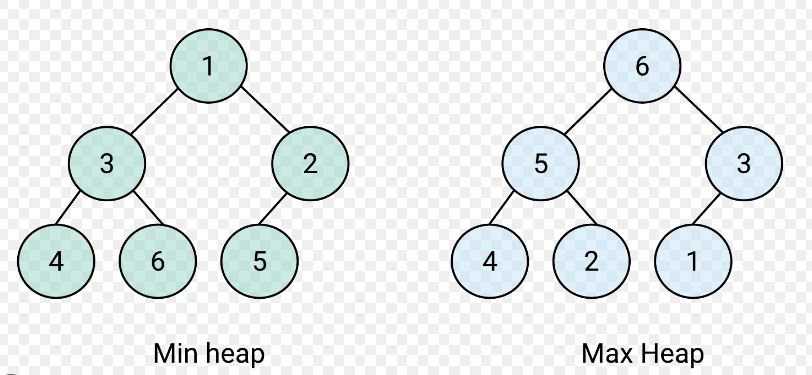
힙(힙트리)

  • 힙은 최댓값 및 최솟값을 찾아내는 연산을 빠르게 하기 위해 고안된 이진트리
  • 우선순위 큐를 만들 때 사용됨
  • Max힙: 부모노드의 값이 자식노드보다 큰 힙
  • Min힙: 자식노드의 값이 부모노드보다 큰 힙


이진힙

  • 완전 이진트리의 일종

완전이진트리

녹색 화살표방향으로 노드를 채워나가는 트리가 완전이진트리
x 표시 되어 있는 트리는 완전이진x

  • 이진힙은 가능한 모든노드(left,right)를 채우고 자식노드로 내려간다. 그렇기 때문에 이진트리에 비해 공간 효율적


배열과 완전이진트리

완전 이진트리는 배열의 형태로 나타낼 수 있다.

  • 위와같은 트리를 배열로 => [A,B,C,D,E]

배열로 나타낸 완전이진트리에서는 아래와 같은 공식이 성립한다.

  • (부모인덱스 * 2) + 1 = 왼쪽자식인덱스
  • (부모인덱스 * 2) + 2 = 오른쪽자식인덱스


공식이 성립하는 수학적 이유

https://cs.stackexchange.com/questions/87154/why-does-the-formula-2n-1-find-the-child-node-in-a-binary-heap


공식이 성립하는 직관적 이유

  • 1번 부터 n번까지의 노드가있다고 가정(1부터 인덱스 시작)
  • n번 노드의 자식노드를 추가할 때 n 이전의 모든 노드(1 ~ n-1)는 둘의 자식을 가지고있다.
  • n-1번 까지의 모든 자식노드의 갯수 + 루트노드 = (n-1)*2 + 1 = 2n-1
  • n번 노드의 첫번째, 두번째 자식은 각각 2n, 2n+1 번째임
  • 0번 인덱스부터 시작한다면 2n+1, 2n+2


배열과 그 성질을 이용한 최대이진힙 구현하기

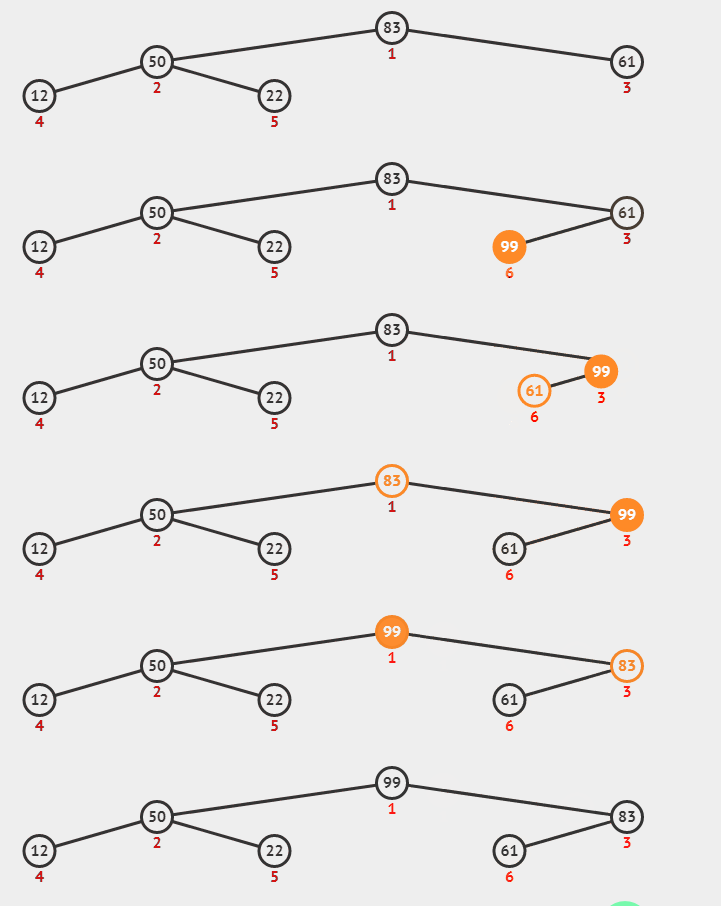
insert 메소드

instance.insert(99)


class MaxBinaryHeap {
  constructor() {
    this.values = [];
  }
  #swapValues(idx1, idx2) {
    [this.values[idx1], this.values[idx2]] = [this.values[idx2], this.values[idx1]];
  }
  #bubbleUp() {
    let newItemIdx = this.values.length - 1;
    while (1) {
      let parentIdx = Math.floor((newItemIdx - 1) / 2);
      if (this.values[newItemIdx] <= this.values[parentIdx]) break;
      this.#swapValues(parentIdx, newItemIdx);
      newItemIdx = parentIdx;
    }
  }
  insert(val) {
    this.values.push(val);
    if (this.values.length > 1) this.#bubbleUp();
    return this.values;
  }

}


extractMax 메소드

  • root를 추출하는 메소드

instance.extractMax()


class MaxBinaryHeap {
    // 생성자
    // 메소드 ...
  #swapValues(idx1, idx2) {
    [this.values[idx1], this.values[idx2]] = [this.values[idx2], this.values[idx1]];
  }
  #sinkDown(currentIdx = 0) {
    while (1) {
      const [firstChildIdx, secondChildIdx] = [currentIdx * 2 + 1, currentIdx * 2 + 2];
      const [firstChild, secondChild] = [this.values[firstChildIdx], this.values[secondChildIdx]];
      const targetValue = this.values[currentIdx];
      if (firstChild === undefined) break;
      if (secondChild === undefined) {
        if (targetValue >= firstChild) return;
        this.#swapValues(firstChildIdx, currentIdx);
        currentIdx = firstChildIdx;
        continue;
      }
      const maxChild = Math.max(firstChild, secondChild);
      if (maxChild <= targetValue) return;
      const childObj = { [firstChild]: firstChildIdx, [secondChild]: secondChildIdx };
      const maxChildIdx = childObj[maxChild];
      this.#swapValues(currentIdx, maxChildIdx);
      currentIdx = maxChildIdx;
    }
  }
  extractMax() {
    this.#swapValues(0, this.values.length - 1);
    const max = this.values.pop();
    this.#sinkDown();
    return max;
  }
  // 메소드..
}


Big O

  • 삽입, 제거 O(logN)
  • 검색 O(N)


우선순위큐

  • 우선순위 큐는 일반적인 우선순위에 따른 순서를 가지고있는 큐이다.
  • 배열, 리스트. 힙 등으로 구현가능
  • 위에서 구현한 이진 힙트리의 각 노드 값이 우선순위라고한다면 위의 이진힙을 곧 우선순위 큐라고도 볼 수 있다.
  • 다만 같은 우선순위를 가진 값에 대한 처리가 추가되어야한다.(삽입된 시간 등 을 체크해서 구현가능)
  • priority 프로퍼티의 값이 클수록 우선순위가 높은것이라고 한다면 위처럼 최대힙을 반대라면 최소힙을 이용하면된다.

트리순회

  • 제너럴 트리의 모든 노드를 순회하는 알고리즘


너비우선탐색(Breadth-First Search)

  • 트리의 너비가 넓을수록 공간복잡도에서 불리


깊이우선탐색(Breadth-First Search)

  • 트리의 깊이가 깊을수록 공간복잡도에서 불리
  • 세종류의 순회방식이있다. 모두다 한쪽 사이드를 전부 순회할 수 나머지 반대방향으로 간다는 것이 공통점


  • 전위순회(Preorder)
    • 탐색순서대로 데이터를 저장한 경우 그 데이터를 기반으로 트리를 다시 만들기 편리함

전위순회가 유리한 상황 (배열 순서가 순회경로임)


  • 후위순회(Postorder)
    • 필요한 자료형태에 따라 유리한 상황이 있을것(구체적인 예시는 잘 모르겠다...)


  • 중위순회(inorder)
    • 탐색순서대로 데이터를 저장한 경우 탐색트리(이진탐색트리 등)의 정렬순서와 동일해 특정작업시 유리

중위순회가 유리한 상황(이진탐색트리) - 오름차순으로 순회함 ((배열 순서가 순회경로임)


구현

  • 모든 트리는 이전에 구현한 이진탐색트리를 이용한다.
  • BFS에서는 이전에 구현한 큐 자료형을 이용한다.
  • DFS의 세 종류는 모두 재귀를 이용했으며 코드가 매우 유사하다(value에 접근하는 타이밍만 다름)


BFS

queue를 이용한 BFS의 구동방식

const { BST } = require("./tree.js");
const { Queue } = require("./queue.js");

class BSTWithTraversal extends BST {
  traverseBFS() {
    if (!this.root) return false;
    const queue = new Queue();
    const trace = [];

    queue.enqueue(this.root);
    while (queue.length > 0) {
      const { val: currentNode } = queue.dequeue();
      trace.push(currentNode.val);
      if (currentNode?.left) queue.enqueue(currentNode.left);
      if (currentNode?.right) queue.enqueue(currentNode.right);
    }
    console.log(trace);
    return trace;
  }
}


DFS - 전위순회

class BSTWithTraversal extends BST {
//... 메소드
  traversePreDFS() {
    const trace = [];
    const pushAndRetraverse = (node) => {
      trace.push(node.val);
      const { left, right } = node;
      if (left) pushAndRetraverse(left);
      if (right) pushAndRetraverse(right);
    };
    pushAndRetraverse(this.root);

    console.log(trace);
    return trace;
  }
//... 메소드
}


DFS - 후위순회

class BSTWithTraversal extends BST {
//... 메소드
  traversePostDFS() {
    const trace = [];
    const traverseAndPush = (node) => {
      const { left, right } = node;
      if (left) traverseAndPush(left);
      if (right) traverseAndPush(right);
      trace.push(node.val);
    };
    traverseAndPush(this.root);
    console.log(trace);
    return trace;
  }
//... 메소드
}


DFS - 중위순회

class BSTWithTraversal extends BST {
//... 메소드
  traverseInDFS() {
    const trace = [];
    const traverseAndPush = (node) => {
      const { left, right } = node;
      if (left) traverseAndPush(left);
      trace.push(node.val);
      if (right) traverseAndPush(right);
    };
    traverseAndPush(this.root);
    console.log(trace);
    return trace;
  }
//... 메소드
}

+ Recent posts